
What is a good Wi-Fi signal? dBm explained
Wi-Fi signal strength is measured in dBm, and it's always a negative number: the closer to zero, the stronger the signal. As a rule of thumb, -50 dBm is excellent, -60 dBm is good, -70 dBm is fair, and around -80 dBm and below is weak. For video calls and streaming, aim for about -67 dBm or stronger.
What is dBm?
dBm stands for decibel-milliwatts. It measures received radio power compared with one milliwatt. Wi-Fi signals reaching your phone are tiny, far less than a milliwatt, which is why the numbers are negative.
The scale is logarithmic, not linear:
- Every 3 dB change means the power doubles or halves. -57 dBm is twice as strong as -60 dBm.
- Every 10 dB change means ten times the power. -60 dBm is ten times stronger than -70 dBm, and a hundred times stronger than -80 dBm.
So a drop from -60 to -70 dBm isn't "a bit weaker". It's a tenth of the power. That's why a few meters or one more wall can change your experience so much.
What do the numbers mean in practice?
These ranges are common industry rules of thumb, not hard limits. Real results also depend on interference, your router and your device.
| Signal | Rating | What it's good for |
|---|---|---|
| -30 to -50 dBm | Excellent | Anything. You're likely close to the router |
| -50 to -60 dBm | Good | Fast, reliable connections, including large downloads |
| -60 to -67 dBm | Fair to good | Streaming, video calls and gaming usually work well |
| -67 to -70 dBm | Fair | Browsing and email fine; calls may start to suffer |
| -70 to -80 dBm | Weak | Slow, with occasional drops; calls and streaming struggle |
| Below -80 dBm | Very weak | Barely usable; connections drop often |
Around -90 dBm, most devices can't hold a connection at all.
Note that these are rough guides, and different apps convert dBm to percentages or quality labels in different ways. If you compare readings, compare dBm from the same device.
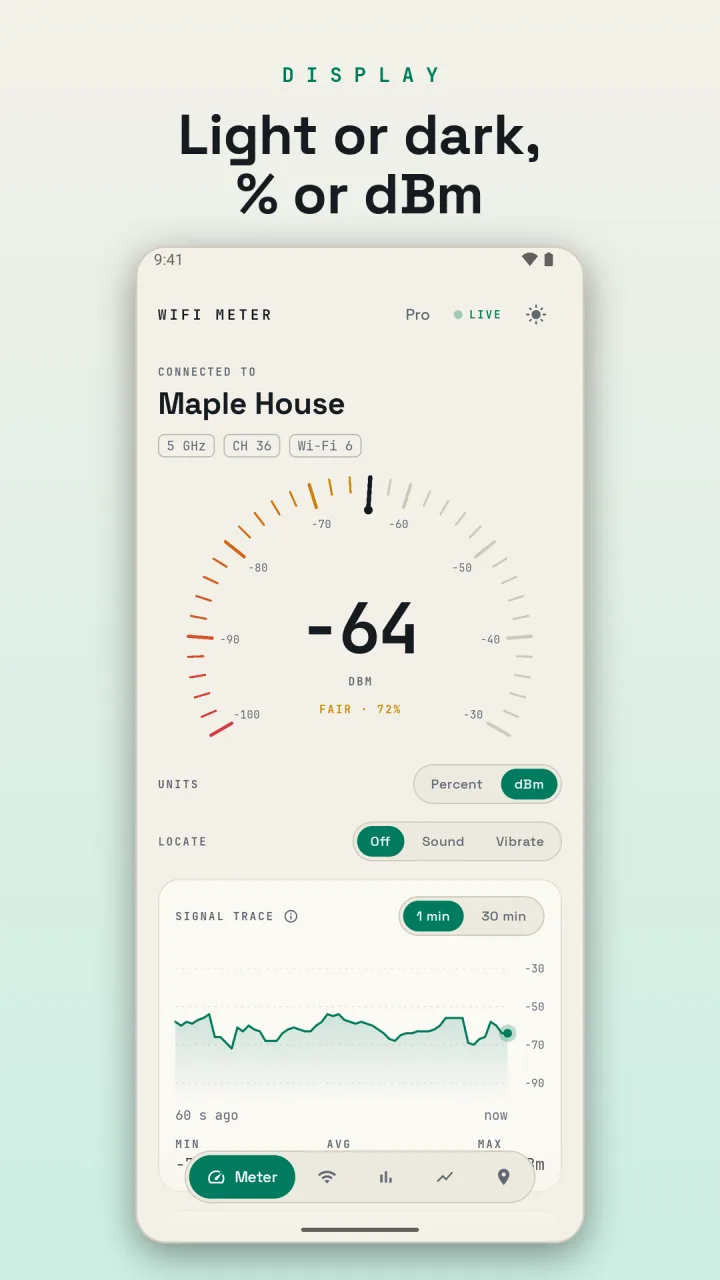
Why do the bars on my phone seem wrong?
The Wi-Fi icon on your phone usually has three or four bars, and each phone maker decides how dBm maps to bars. Full bars on one phone might be -65 dBm; on another, -55. The icon also tends to update slowly and smooth out changes.
That's fine for a quick glance, but it hides the details. Two rooms that both show "full bars" might differ by 15 dB, which is more than 30 times the power. When you're troubleshooting, use the actual dBm number.
Is signal strength all that matters?
No. A strong signal is necessary but not enough. Three other things matter:
- Link speed. Your phone and router agree on a data rate, shown in Mbps in the Wi-Fi details on many phones. It drops as the signal gets weaker or noisier. A strong signal with a low link speed points to interference or an old Wi-Fi standard.
- Noise and interference. Other networks on the same channel compete for airtime. You can have -55 dBm and still be slow if your channel is packed. See how to find the best Wi-Fi channel.
- Your internet line. Perfect Wi-Fi can't make a slow internet connection faster. See is it your Wi-Fi or your internet provider?
Why does my signal keep changing?
Wi-Fi readings bounce around even when you stand still, often by 3–5 dB. People walking around, doors opening, your hand on the phone and other devices all affect the signal. That's normal.
What matters is the overall level and the dips. If your signal sits at -60 dBm but drops to -80 dBm every few minutes, that's when calls freeze. Watching the signal over a minute or more tells you much more than one reading.
Why is 2.4 GHz stronger than 5 GHz from the same router?
2.4 GHz signals travel farther and pass through walls better, so they almost always read stronger than 5 GHz from the same router. But 2.4 GHz is slower and more crowded. A 5 GHz connection at -65 dBm is often faster than a 2.4 GHz connection at -55 dBm. Don't switch bands based on dBm alone; check the speed too.
How do I improve a weak signal?
- Move closer to the router, or remove obstacles between you and it.
- Move the router to a higher, more central spot.
- Change to a less crowded channel.
- Add an extender or mesh node, placed where the signal is still good.
The guide on finding Wi-Fi dead spots walks through each of these.
Doing it with WiFi Meter
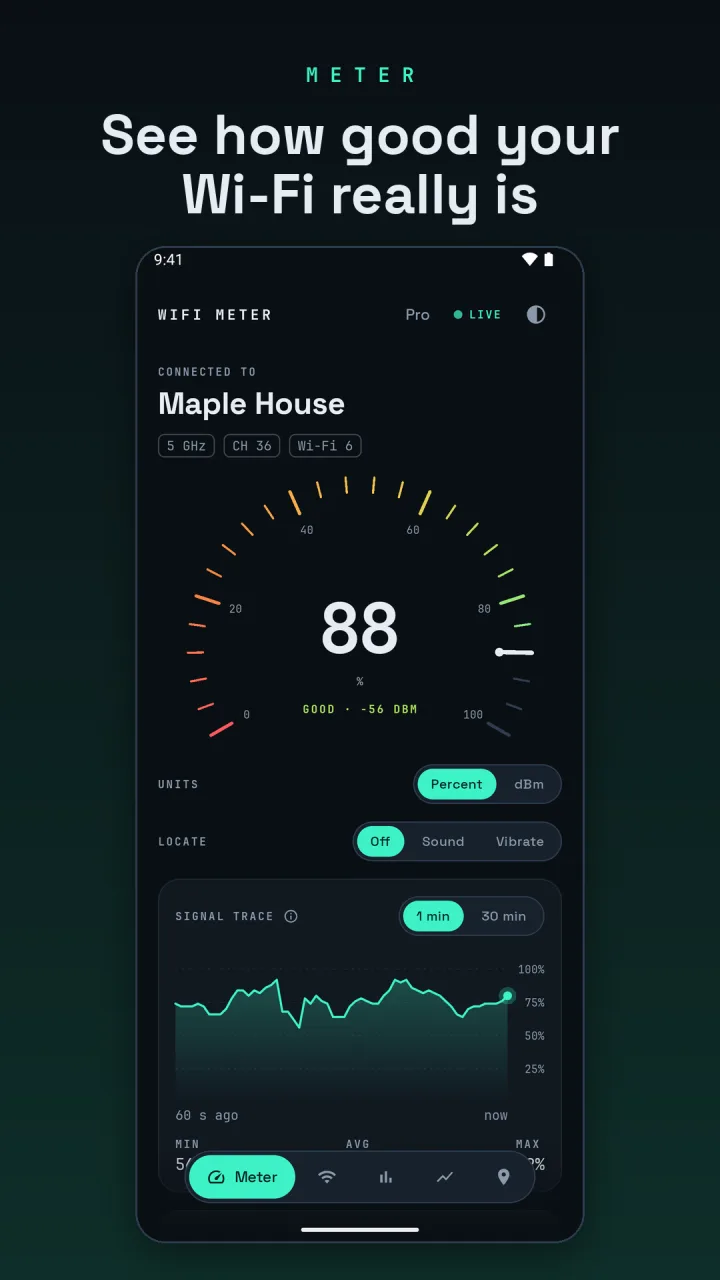
The Meter tab shows a live gauge of your signal, as an easy percentage or in dBm; switch units right on the tab. Below it, you see quality, band, channel, Wi-Fi standard and link speed, plus a signal trace of the last 60 seconds so you can see every dip. Tap the (i) next to a reading for a short explanation. With WiFi Meter Pro, the trace can also show the last 30 minutes.
The connected network updates every second. WiFi Meter asks for location permission only because Android requires it for Wi-Fi scans. It never reads your GPS position.